WEBGL • REAL-TIME FILTERS • OVERLAYS • FACE TRACKING

Leoga Foto Booth
fast, lightweight, event-ready.

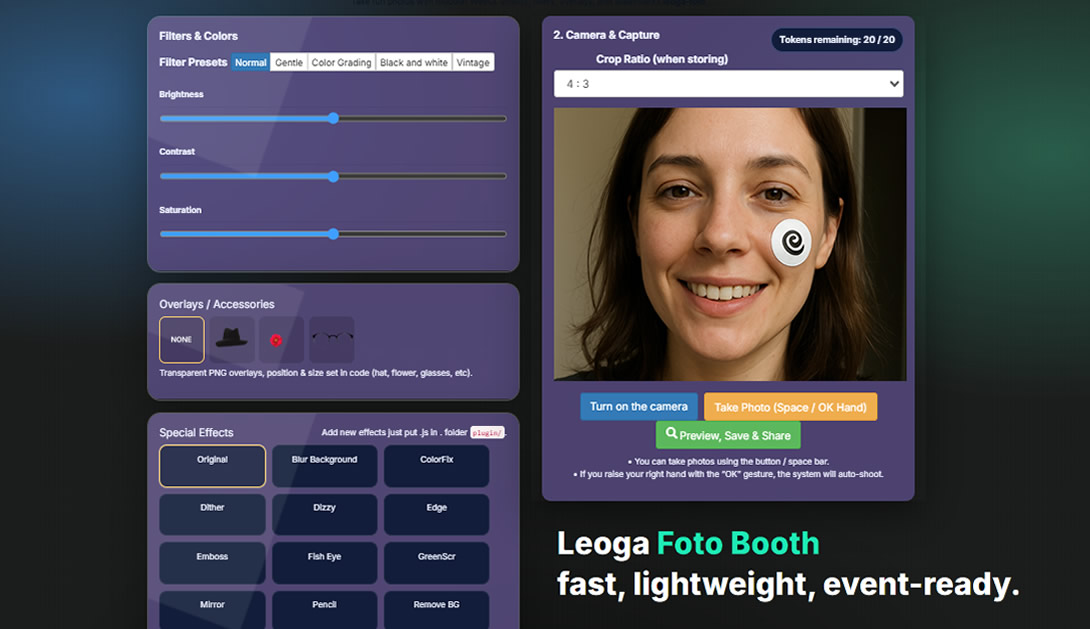
A browser-based photobooth: real-time WebGL filters, PNG accessory overlays, face tracking, automatic watermarking, server-side saving, and WhatsApp sharing.

Built for speed: fewer clicks, more results. Perfect for booths with real queues.

Snapshot – the core system
Core: Real-time WebGL filters
Overlays: Hats / glasses / stickers
Saving: Server-side + watermark
Sharing: WhatsApp link
Control: Tokens per visitor
• Modular: add new effects by dropping JS plugins into the folder.
• UI can be themed for any event or brand.
Key features

Everything a booth needs, without the weight.

The flow stays clean: start camera → choose filter/overlay → shoot → save → share.

Real-time filters (WebGL)

  • Brightness / Contrast / Saturation.
  • Presets: soft, B/W, vintage, grading.
  • Modular effect plugins (drop-in JS).

Overlays & lightweight AR

  • Hats, glasses, cheek stickers, and more.
  • Face tracking (landmarks) for better placement.
  • Transparent PNG overlays.

Save & Share

  • Automatic watermark.
  • Server-side save (file + URL).
  • One-click WhatsApp share.
How it works

Simple flow. Faster queues.

Step-by-step
  • Visitor enters name & phone (optional for token tracking).
  • Start camera, choose crop ratio (4:3 / 1:1 / 16:9).
  • Pick filter & overlay, then shoot (button / Space / auto-shot).
  • Preview → Save → Share on WhatsApp.
Technical overview
  • Rendering: Canvas 2D + WebGL shaders (CPU fallback when WebGL is unavailable).
  • Face tracking: face-api.js (optional).
  • Plugins: auto-listed effects/frames from folder.
  • Tokens: control the number of shots per visitor for events.
Use cases

Who is it for?

Events / Brand booths

  • Custom overlays & branded watermark.
  • Share links for viral moments.
  • Fast flow for high traffic.

Restaurants / Cafes

  • Seasonal promo frames.
  • QR/share link for customers.
  • Kiosk/tablet-friendly mode.

Weddings / Gatherings

  • Couple name & date frames.
  • Server-side gallery (optional).
  • Fun overlays for guests.
FAQ

Frequently asked questions

No. It is web-based. Open the URL, allow camera access, and you are ready.
Yes. Overlays, frames, watermark, presets, and UI can be adapted to your brand/event.
A CPU fallback is available. It will still work, with performance depending on the device.
Yes. The layout is responsive. Pick a stable camera device and use shot tokens to keep the queue smooth.
Demo

Ready to try the live version?

Open the demo, test the camera, play with effects, and feel the flow. For an event-ready version, just theme it and set a watermark.

Open Demo App Chat on WhatsApp

Tip: Chrome (desktop/Android) usually gives the most stable camera permission flow.